Airpass Connections Driver App
A purpose-built mobile application for airport luggage drivers, streamlining terminal pickups, delivery handoffs, and chain-of-custody verification into an intuitive workflow.
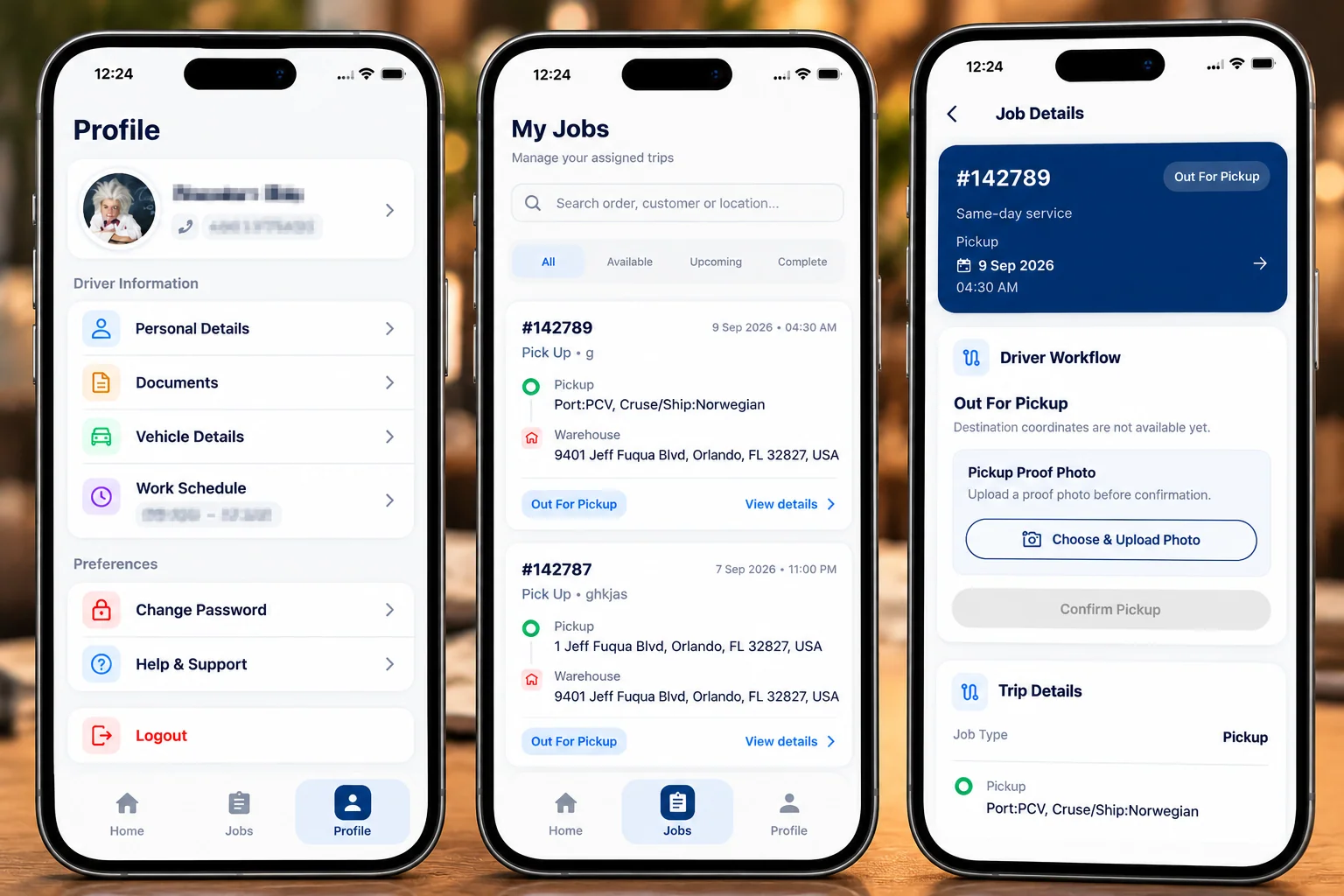
Built Around the Driver’s Daily Workflow
Engineered for high-tempo airport terminals, eliminating operational confusion and guiding luggage drivers through verified pickups, transfers, and delivery handoffs.
Instant Assignment Visibility
Drivers see their daily shift queue immediately upon opening the app—distinguishing active pickups, scheduled transfers, and completed deliveries at a glance without sorting through redundant dispatch chatter.
Precise Job & Flight Data
Every task displays traveler identification, incoming flight numbers, airport terminal locations, and exact baggage counts, ensuring drivers connect with the correct passenger baggage without cross-referencing paper logs.
Step-by-Step Verification
From luggage pickup at the airport carousel to the final customer drop-off at home or hotel, drivers follow a linear milestone flow with mandatory photo verification establishing an unbreakable chain-of-custody.
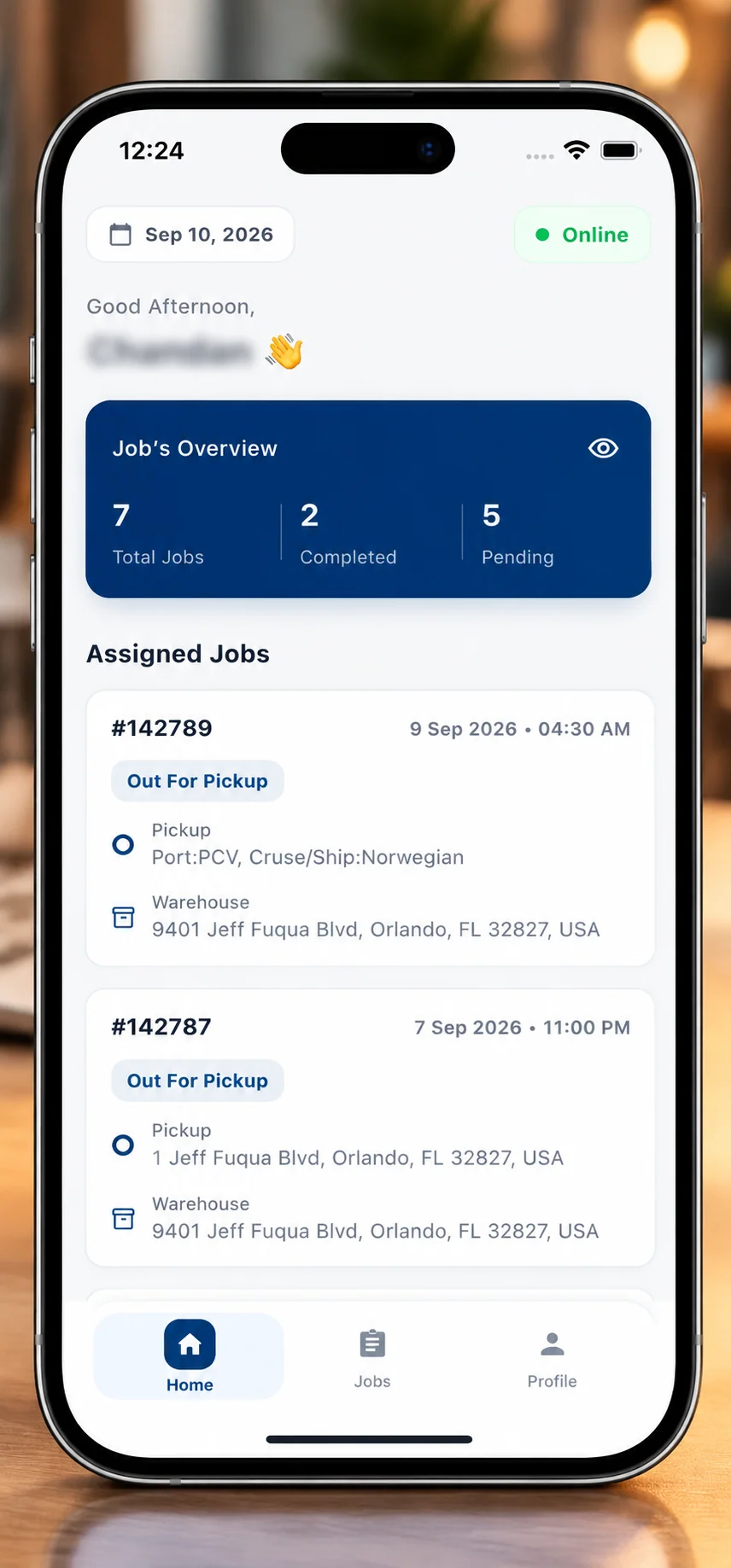 Live Shift Status
Start the Day With a Clear Operational Overview
The driver dashboard functions as an instant operational snapshot. Rather than burying drivers under deep multi-level menus, the interface highlights current shift metrics, urgent pending tasks, and direct routes at a glance.
Shift Summary Telemetry
Prominent stat counters show total assigned jobs, picked-up baggage in transit, and successfully completed deliveries for the active duty period.
Immediate Next Task Focus
The active airport pickup is elevated to the top of the interface, highlighting the terminal identifier, scheduled time window, and expected bag count.
One-Tap Quick Actions
Field drivers can jump directly into their full task list or initiate their assigned pickup route with a single thumb press.
From Assignment to Action
The "My Jobs" queue is engineered for operational speed. Tasks are categorized by their lifecycle state, allowing drivers to focus on urgent luggage pickups without getting bogged down by future schedule entries.
Chronological Queue
Luggage pickups are organized in sequence based on incoming flight landing times and customer delivery windows.
Key Baggage Data
Each card clearly displays the passenger name, baggage quantity, terminal carousel, and pickup status.
Status Badging
Color-coded indicators provide immediate visual recognition between Assigned, In-Transit, and Delivered bags.
Fast Tab Filtering
Drivers switch seamlessly between active orders and completed history with zero reloading lag.
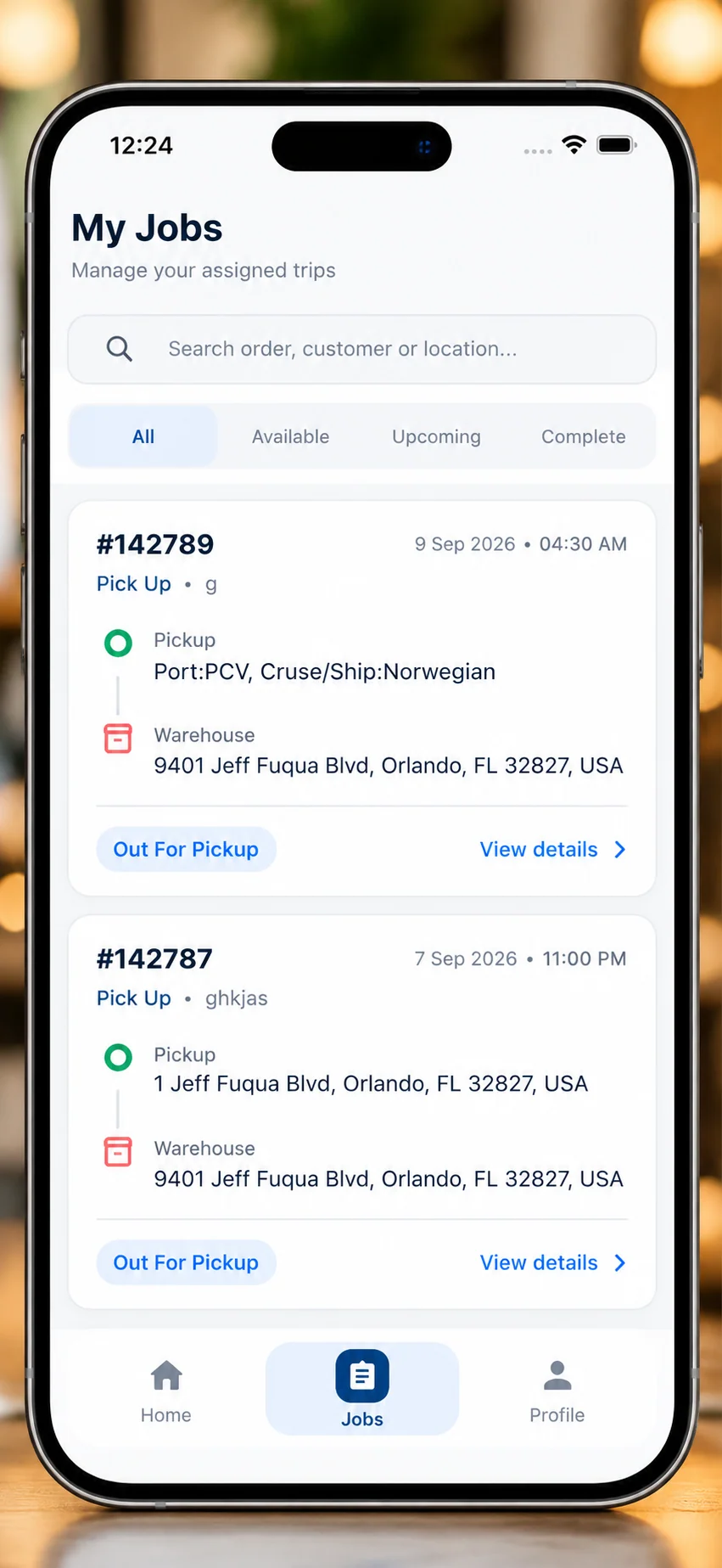 My Jobs Queue
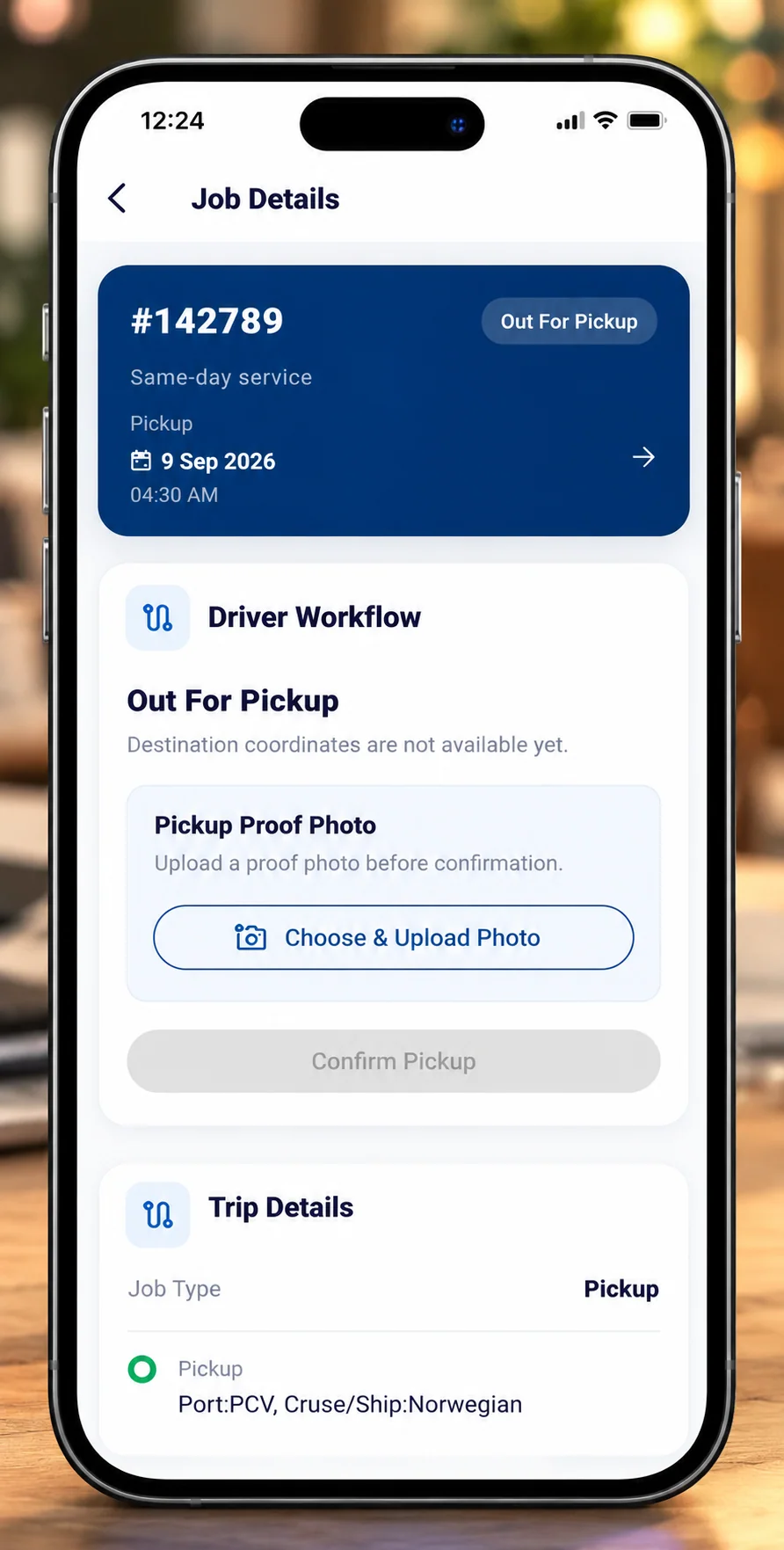 Pickup Verification
Make Every Pickup Step Clear & Verifiable
Airport luggage handling demands rigorous custody tracking. The Job Details screen guides the field driver through a structured milestone verification flow, providing real-time synchronization between the airport floor, central dispatch, and the customer app.
Luggage Tag & Baggage Verification
Before custody is accepted, drivers verify physical luggage tags and piece counts against the passenger booking details on screen.
In-App Proof Photo Capture
Drivers capture a clear photograph of the luggage and tags. The photo is securely uploaded and attached to the job record with an automated timestamp.
One-Touch Status Progression
Drivers advance the job state (e.g., "Picked Up" → "In Transit" → "Delivered") with a single thumb tap, triggering instant dispatch status updates.
Direct Dispatch Hotline
Immediate access to dispatch coordinators allows drivers to report flight delays, carousel changes, or gate modifications without delay.
One Connected Mobile Journey
How the Airpass Driver App guides a field operator through the full luggage lifecycle—from morning shift authentication to final customer delivery confirmation.
Authentication & Active Queue
Driver signs in securely, reviews daily vehicle assignment, and inspects the morning pickup queue.
Flight & Terminal Details
Inspects customer booking, airline flight number, estimated arrival time, and designated terminal.
Baggage Identification
Locates customer baggage at carousel or airport hub, checking airline tags and luggage count.
Photo Proof Capture
Snaps condition and baggage tag photos directly in the app to establish timestamped chain-of-custody.
Status Progression
One-tap update marks job "In Transit," notifying dispatch and customer tracking automatically.
Delivery Confirmation
Hands luggage to customer or storage partner, marks delivery complete, and advances to the next task.
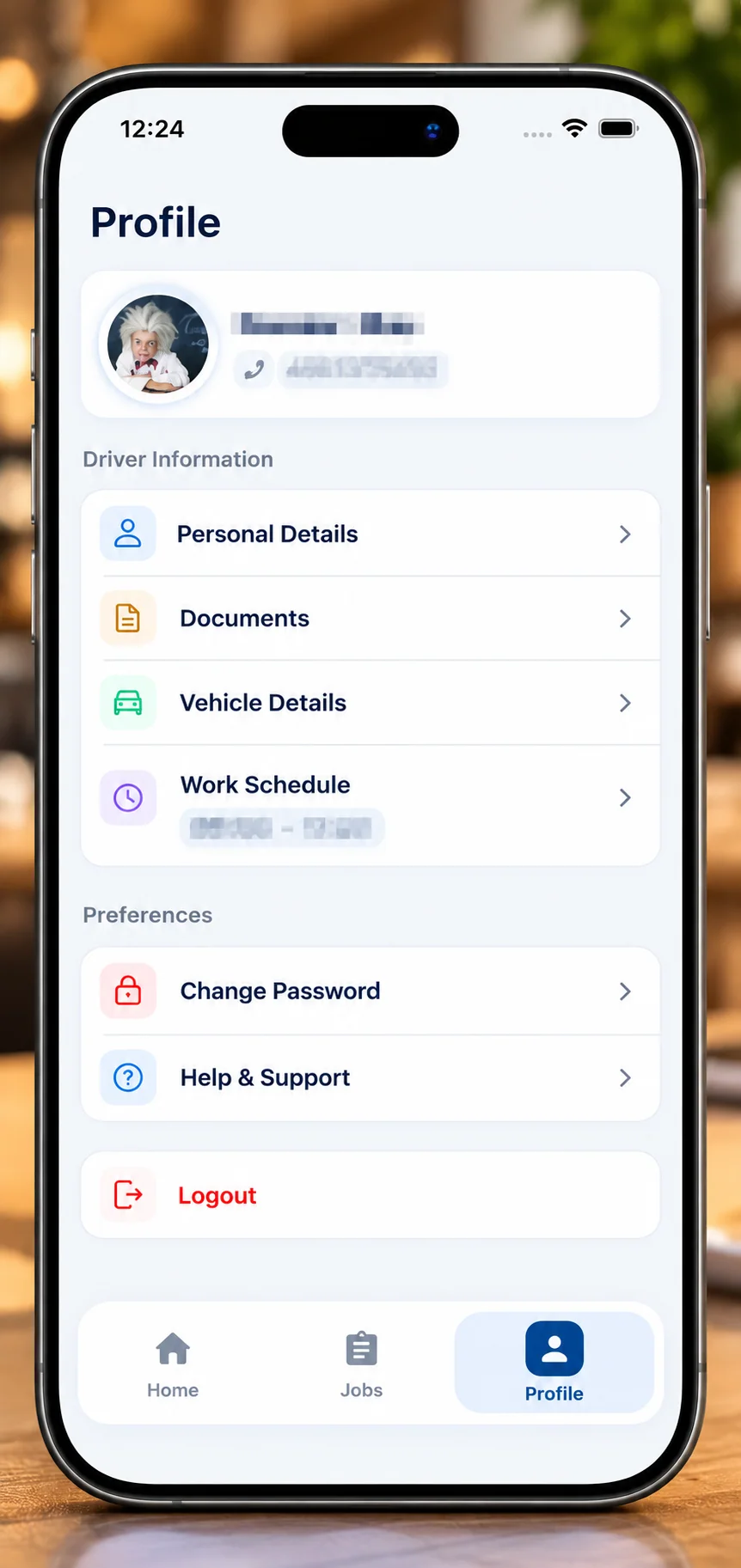 Driver Profile
A Dedicated Space for Driver Information & Shift Controls
Beyond daily pickup execution, drivers require an accessible, clutter-free space to verify their credentials, check assigned airport hubs, adjust notification triggers, and contact support.
Verified Driver Profile
Displays verified driver identification, official license status, and operating permissions for airport security checkpoints.
Fleet & Hub Assignment
Confirms the assigned fleet transport vehicle, airport hub zone, and designated regional luggage delivery routes.
Notification Preferences
Drivers customize audible alert settings for newly assigned pickups and urgent flight schedule modifications.
Support & Security
Direct links to the 24/7 driver support team, secure session logout, and privacy policy compliance documentation.
Engineered for the Field, Not the Desk
Field logistics applications cannot rely on desktop software paradigms. Every screen was tailored for high-glare outdoor environments, physical luggage handling, and rapid one-handed usage.
High Contrast in Direct Sunlight
Designed with deep typography contrast ratios and bold typographic scales so screens remain readable on bright airport tarmacs and outdoor curbs.
One-Handed Thumb Zone
All primary operational triggers—status confirmations, photo shutter buttons, and navigation tabs—are anchored in the bottom natural thumb zone.
Generous 48px+ Tap Targets
Buttons, list items, and status pills maintain a minimum 48x48px hit area, allowing drivers to interact comfortably on the move or with work gloves.
Minimal Cognitive Overhead
Screens present only the single next required action. By hiding non-essential telemetry until requested, drivers execute pickups with zero confusion.
Modern, Scalable Logistics Technology
Engineered using production-proven mobile and backend frameworks to ensure 99.9% uptime, rapid API response, and rock-solid data integrity across thousands of luggage transfers.

Flutter Mobile SDK
Cross-Platform UI EngineCompiles to native ARM machine code for iOS and Android, rendering at a smooth 60fps with unified component styling and reliable offline state storage.

.NET Core Web API
High-Throughput BackendLightweight RESTful microservices handling mobile authentication, photo upload streaming, dispatch events, and sub-second status synchronization.

Microsoft SQL Server
Relational Data PersistenceEnterprise ACID-compliant relational storage ensuring tamper-resistant chain-of-custody audit logs, driver shift metrics, and baggage records.
Offline Action Caching
Enables drivers to record luggage verifications inside subterranean airport bag rooms; actions sync automatically once connectivity resumes.
End-to-End Encryption
All passenger identifiers, baggage photo proofs, and GPS status coordinates are encrypted in transit over secure TLS 1.3 tunnels.
Unified Dispatch Sync
Real-time webhook and API relays immediately update the central Airpass Web/CRM dispatch portal and passenger tracking notifications.
Explore Connected Case Studies
The Driver App operates in unison with the passenger-facing Customer App and central Web & CRM management platform to power end-to-end airport luggage delivery.
Airpass Connections – Customer App
Discover the companion passenger mobile application built for airport luggage booking, delivery scheduling, itemized pricing, and real-time order tracking.
View Customer App Case Study100+ Production Software Case Studies
Explore our complete catalog of enterprise web platforms, custom CRM systems, AI workflow automations, and cross-platform mobile apps delivered since 2014.
Browse All Case StudiesHave a Custom Mobile or Logistics Application in Mind?
From mission-critical field logistics to consumer-facing mobile experiences, our engineering team brings deep architectural expertise to every phase.